
Xfinity
ComcastProductivity
3.892.93K Reviews
- Version
- 6.14.0-2
- Installs
- 10.00M
- Age Rating
- Everyone
Screenshots
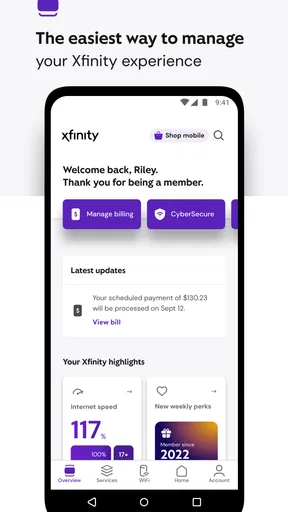
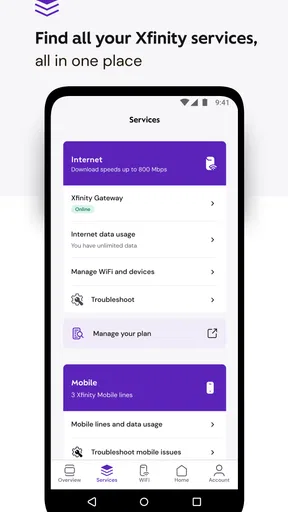
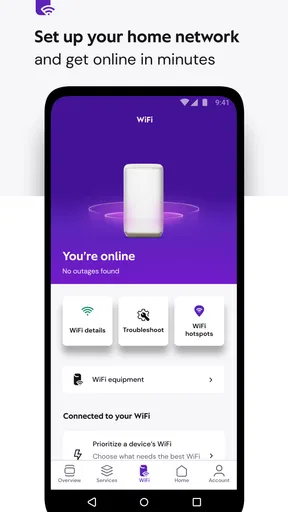
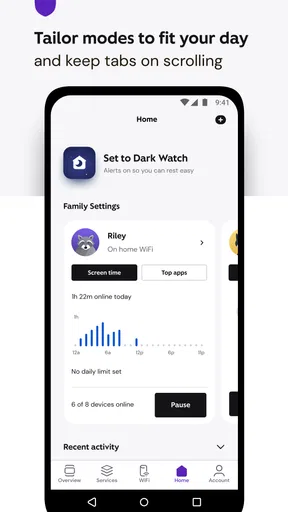
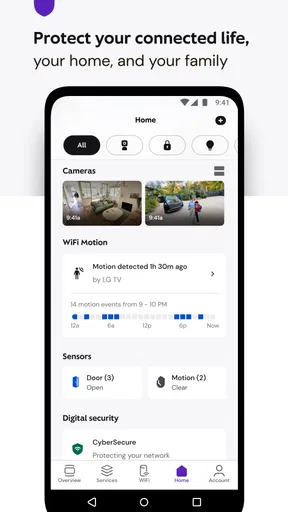
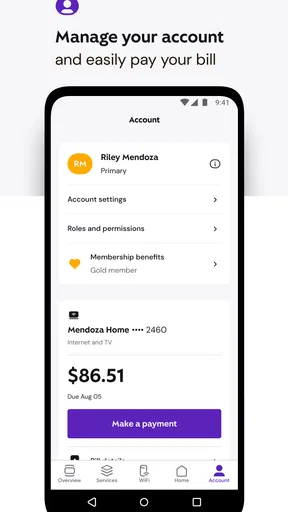
Our Review of Xfinity
 Analysis by Appyee
Managing a home internet and entertainment service from a phone sounds simple, but the difference between a useful companion app and a frustrating one appears when something goes wrong. Xfinity is Comcast’s free productivity app for bringing account and service controls into one mobile place. I spent time looking at it less as a promotional dashboard and more as a practical tool: when the connection is slow, a bill needs attention, or I want to understand what is happening with my home service, does the app actually reduce the number of steps?
My answer is mostly yes, particularly for people who already use Comcast services and want a faster route to account information than a browser. It is not a universal internet-management solution, and it will not replace a router’s full administration panel or a dedicated budgeting app. Its value comes from being tied to the customer relationship. That makes it convenient in the right household and much less useful outside that ecosystem.
Why the single-place control approach matters
The central capability is consolidation. Instead of switching between separate web pages for account details, service support, billing tasks, and connection-related help, Xfinity gives me a mobile starting point for those jobs. That sounds like a small convenience, but it matters when I am standing in a hallway next to a modem with a family member asking why the Wi-Fi is not working. The app turns a vague problem into a place where I can begin checking the service.
I see the strongest benefit in reducing friction rather than adding advanced technology. The app does not need to make me an expert in networking to be useful. It is more valuable when it helps me identify whether the issue belongs to my account, my service, or my local equipment before I spend time restarting everything at random. In that sense, its “all in one place” idea has a real effect: it gives ordinary customers a more direct path to the information Comcast already holds about their service.
That focus also explains why I would classify it as a home-service management app rather than a general productivity tool. Its productivity benefit is situational. I am not using it to write documents or organize projects; I am using it to avoid unnecessary calls, repeated logins, and searching through old account emails when a service question comes up.
The app comes from Comcast and has been available since Apr 18, 2017. It is free to install, carries an Everyone age rating, and its current version is 6.9.0-9. Those details make it approachable for a household where several people may need basic access, although the usefulness still depends on having a compatible Comcast customer account and services to manage.
What the consolidated view changes
A normal browser account page can often expose similar information, but mobile access changes the moment of use. I am more likely to open an app while away from my desk, during a service interruption, or when I am trying to help someone else at home. A dedicated app can keep the task oriented around the account instead of making me navigate a broad website designed for many purposes.
There is also a practical psychological benefit. When an internet problem appears, people often jump between a speed-test app, a browser, the modem, and customer support. Xfinity does not eliminate the need for those tools, but it gives me a service-specific checkpoint before I escalate. That is especially useful if I am unsure whether the problem is widespread, tied to my account, or caused by a device in the home.
I would not describe this as a replacement for technical troubleshooting. It is better understood as a control surface for the customer side of the connection. That distinction is important. Someone looking for packet-level diagnostics, detailed wireless channel controls, or a complete smart-home network map will probably need other tools. Someone who wants a clear place to begin with Comcast-related tasks is the audience this design serves.
Using Xfinity during an ordinary service problem
Consider a realistic evening scenario. I am preparing dinner while another person in the house is trying to join a video meeting, and the connection suddenly becomes unreliable. My first instinct might be to restart the router, but that can interrupt everyone and may not solve the real cause. With Xfinity, I can begin by looking at the account and service side of the problem. If the issue appears to be connected to the provider or the account, I have a more informed next step. If everything looks normal there, I know I should investigate the particular device, room, or wireless conditions instead of assuming Comcast is responsible.
That workflow is more valuable than a long list of isolated buttons. The app helps me decide what to do next. I can use it before contacting support, while speaking with support, or after a change has been made to the service. Keeping the phone nearby also makes it easier to refer to account information without opening a laptop in the middle of a household interruption.
A useful habit is to open the app before an urgent problem occurs. I would sign in, make sure I understand where the important account areas are, and check that the household knows which account credentials are appropriate. That preparation prevents the worst possible first experience: discovering during an outage that nobody knows which email address belongs to the service account.
Another practical tip is to separate service diagnosis from device diagnosis. If one phone cannot connect but other devices work, I would not treat the app as proof that the whole connection is broken. I would use Xfinity to check the service context, then examine the affected device. If every device has trouble, the account and service view becomes more relevant. This simple distinction prevents the app from becoming a source of false certainty.
Where the app saves time
The time savings are most noticeable for routine account actions. A customer may need to review information, deal with a service question, or find a support path while away from home. In those moments, a mobile app is less cumbersome than remembering a web address and navigating through a desktop-style site. I appreciate that the app’s purpose is immediately understandable: it is the Comcast service companion, not a separate utility whose role I have to discover.
It can also help households with uneven technical confidence. The person who installed the service may not be the person who manages it day to day. A family member who is comfortable using a phone but uncomfortable with router terminology can begin with the account app rather than opening an advanced administration page. That does not solve every technical issue, but it lowers the entry point.
For renters or people who cannot physically change networking equipment, the account-focused approach is particularly sensible. They may not have permission to replace hardware or alter building wiring, but they still need a way to understand their service and reach the appropriate support route. The app is more useful in that situation than a tool built around deep hardware customization.
A second scenario: handling service information away from home
Imagine I am traveling and a family member sends a message saying the home connection is behaving strangely. I may not be able to inspect the modem or test every device, but I can still use the account side of the service to understand what is available to me. That remote perspective is one of the better reasons to install the app even if I usually manage everything from a computer.
There is a tradeoff, though. Remote access is only helpful if the right person can sign in and the account structure is clear. In a shared household, the primary account holder may be the only person who can complete certain actions. I would not assume that installing the app automatically gives every family member equal control. Before relying on it for emergencies, I would clarify who owns the account and who is expected to manage it.
What feels less convenient
The biggest limitation is that Xfinity is tightly tied to Comcast. That is also its strength, but it means the app has little value for someone who uses another internet provider. Even within a Comcast household, its usefulness depends on the services connected to the account and on what the user is actually trying to do. It is not a neutral dashboard for every device, provider, or network in the home.
I also would not use it as my only troubleshooting instrument. An account app can show the provider-facing side of a problem, but it cannot replace testing the affected device, checking whether a single room has poor wireless coverage, or confirming whether a problem is limited to one application. If I wanted detailed network visibility, I would look toward router tools or specialist diagnostics. Xfinity is the better choice when the question is “what is happening with my Comcast service?” rather than “what exactly is happening to every packet in my network?”
Another point of friction is the possibility of overlapping tools. Many households already have a browser bookmark, a modem interface, a speed-test app, and a support phone number. Xfinity does not make those alternatives unnecessary. Its advantage is the account connection, not total coverage. If I only need to run a quick speed test or change a local wireless setting, another tool may be faster.
Login and account ownership can also shape the experience. A service-management app has to protect account information, so I would expect access to be more deliberate than opening a simple calculator or notes app. The practical lesson is to keep credentials organized and avoid assuming that the person paying the bill and the person troubleshooting the Wi-Fi have identical access. That is a household workflow issue, but it can determine whether the app feels effortless or blocked at the wrong moment.
The app’s average rating is 3.8 from around 347 thousand ratings, with more than 91 thousand written reviews. I read that as a sign of a broadly useful but not universally smooth experience. A service app is judged not only by its interface but also by the quality of the underlying account and support situation. When the service is working and the account is straightforward, the app can feel convenient. When a customer is already dealing with a complicated problem, expectations become much higher.
When another option is better
If I am managing a mixed-provider household, Xfinity is not the right central dashboard. A general network-monitoring tool or the router manufacturer’s app may offer a clearer view of devices across the home. If I need detailed parental controls, wireless configuration, or device-level traffic information, I would first check whether my router’s own software is designed for that job.
If my goal is simply paying attention to household spending, a budgeting app is more suitable. Xfinity may help with the provider account, but it is not a replacement for a broader financial workflow. Likewise, if I rarely need account support and prefer using a desktop browser, installing a dedicated mobile app may not change much for me.
For a Comcast customer, however, using only the browser can be unnecessarily slow during a time-sensitive issue. The app earns its place when I want the service relationship available in my pocket, especially when I am away from the computer or helping another person solve a connection problem.
Who benefits most from the app
The best fit is a Comcast customer who wants a practical mobile entry point for service and account management. I would recommend it to households where internet reliability matters, where more than one person may need to understand the account, or where the primary account holder is often away from home. It is also a good match for people who prefer guided service information over technical network screens.
It is less compelling for advanced users who already have a carefully configured home network and know exactly which specialist tools they need. Those users may still appreciate the account connection, but they should not expect the app to expose every setting or diagnostic detail. The same applies to anyone who is not a Comcast customer: the app’s central capability cannot provide much value without that service relationship.
One of the more useful ways to adopt it is to assign it a narrow role. I would use Xfinity for account context, provider-side service questions, and the first step in support. I would use the router interface for local network settings, a speed-test tool for basic performance checks, and the affected device itself for app-specific problems. The best results come from treating Xfinity as the starting point, not the entire troubleshooting toolkit.
That division of labor prevents disappointment. It also makes the app more effective because I know what information I am trying to get from it. Instead of opening it and expecting a complete explanation for every Wi-Fi complaint, I use it to answer a narrower question: is there something about my Comcast account or service that should change what I do next?
Its scale reinforces that this is a mainstream utility rather than a niche experiment. Xfinity has passed ten million installs, and its free price removes the usual barrier to trying it. The minimum operating-system requirement is 12, so users on older devices should check compatibility before planning around it. For people with supported phones, the low-cost trial is reasonable because the app’s usefulness can be judged quickly against their own account habits.
My practical recommendation
I would install Xfinity if I were responsible for a Comcast household, especially if I wanted to handle service questions while away from a computer. I would sign in before needing help, identify the account owner, and keep the app alongside—not instead of—the router’s management tools. That small preparation makes it much more useful during an interruption.
I would skip it if I wanted a provider-neutral network controller, advanced wireless diagnostics, or a general productivity suite. Those expectations do not match its strongest purpose. The app is at its best when the problem is connected to the Comcast customer relationship and I need a convenient mobile route to understand or manage that relationship.
After using it with that expectation, I find the “more control” idea credible, but only in a specific sense. It gives me more immediate access to Comcast-related service information and actions; it does not give me unlimited control over the physical network or every device connected to it. That distinction is easy to miss, and understanding it is the key to having a good experience.
Overall, Xfinity is a sensible free companion for Comcast customers who value convenience over technical depth. Its consolidated approach can save time in ordinary account tasks and give me a calmer first step when the home connection misbehaves. The app is not perfect for every household, and it should not be mistaken for a complete network diagnostic system, but for the people it serves, its real strength is turning a provider account into something I can reach and act on from my phone.
Privacy and Permissions
See what permissions an app requests and how it handles your data.
- Location
- approximate location (network-based), precise location (GPS and network-based)
- Phone
- read phone status and identity
- Photos/Media/Files
- read the contents of your USB storage, modify or delete the contents of your USB storage
- Storage
- read the contents of your USB storage, modify or delete the contents of your USB storage
- Camera
- take pictures and videos
- Microphone
- record audio
- Wi-Fi connection information
- view Wi-Fi connections
- Device ID & call information
- read phone status and identity
- Other
- view network connections, pair with Bluetooth devices, access Bluetooth settings, change network connectivity, allow Wi-Fi Multicast reception, connect and disconnect from Wi-Fi, full network access, change your audio settings, run at startup, reorder running apps, control vibration, prevent device from sleeping, read Google service configuration
Verdict
Strengths of Xfinity
- Reliable access to Xfinity account and billing details
- Easy access to support, troubleshooting, and service notifications
- Secure sign-in with account management tools
- Useful for monitoring connected devices and home network activity
- Convenient option for managing services while away from home
Limitations of Xfinity
- Many features require an active Xfinity customer account
- Some tools may vary by region or subscribed service
- App performance can depend heavily on internet connectivity
- Frequent notifications may feel excessive to some users
- Certain support issues may still require contacting an agent
Similar Picks in This Category
View All
Google Calendar
Google LLC4.6

Google Drive
Google LLC4.3

Google Assistant
Google LLC3.9

Microsoft OneDrive
Microsoft Corporation4.6

Samsung Calendar
Samsung Electronics Co., Ltd.4.1

Microsoft OneNote: Save Notes
Microsoft Corporation4.6
Frequently Asked Questions
What is Xfinity, and what can I use the app for?
Xfinity is the official mobile app for managing many Comcast Xfinity services from an Android or iOS device. After signing in, you can view and pay bills, check service details, troubleshoot common connection problems, manage Wi‑Fi settings, review data usage, and contact support. Depending on your account, the app may also provide access to mobile, internet, TV, and home security features.
Do I need an Xfinity account or subscription to use the app?
Yes, most useful features require an active Xfinity account and a valid login. The app is primarily designed for existing Xfinity customers, so you may need to verify your identity before managing billing, equipment, Wi‑Fi, or account settings. Some information may be visible without signing in, but the full experience depends on the services connected to your Xfinity account.
Can I manage my Xfinity Wi‑Fi network and connected devices?
In many cases, yes. Customers with compatible Xfinity internet equipment can use the app to view their network, change the Wi‑Fi name or password, share guest access, and see connected devices. Certain controls, such as pausing a device or setting parental restrictions, may depend on your gateway, plan, and account permissions. Older equipment or unsupported configurations may limit available options.
Can I pay my bill and troubleshoot service problems through Xfinity?
The app allows eligible customers to review billing information, make payments, manage automatic payments, and check account notifications without opening a desktop browser. It also includes guided troubleshooting for issues such as slow internet, connection interruptions, or equipment problems. These tools can be convenient for basic fixes, although complicated outages, billing disputes, or hardware failures may still require Xfinity customer support.
Is the Xfinity app free, and what permissions or limitations should I know about?
The Xfinity app is generally free to download, but it does not replace an Xfinity subscription and does not provide services without an eligible account. Depending on the features you use, it may request access to notifications, local network information, location services, or device-related data. Availability can vary by region, plan, equipment, and app version, so updating the app may be necessary.
